Release Notes
Prof-UIS 2.64 is a minor release. The version introduces a lot of new features, improvements and bug fixes.
What’s New
Ribbon Bar
Added
key tips for controls in
CExtRibbonBar and CExtRibbonPage (see screenshots for the top level
commands, a ribbon
group and the application
menu).
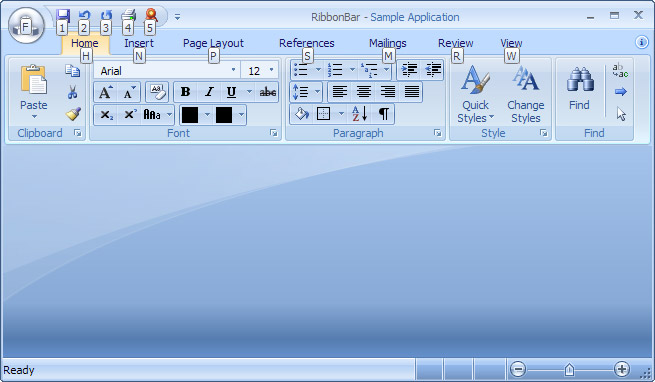
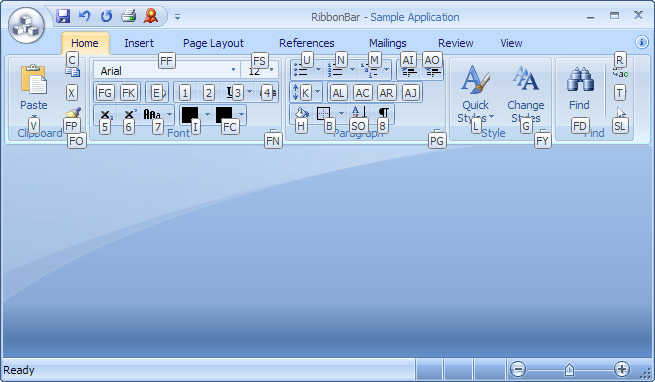
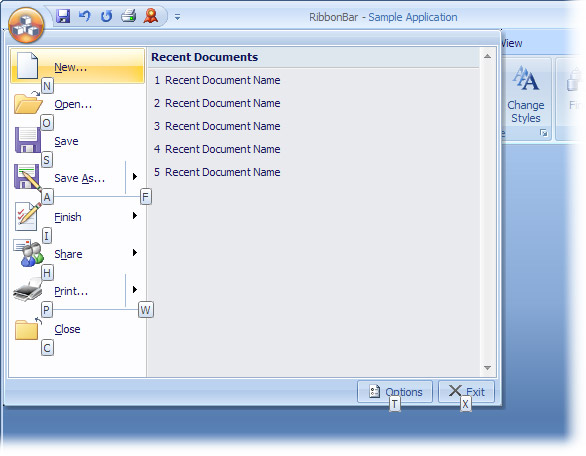
The
Ribbon Bar control can now be used in MDI applications. This feature is
demonstrated in a new RibbonBarMDI sample.
Added
a
CExtRibbonNodeMdiRightButtons class that implements
a node for MDI buttons in the right top corner of the ribbon bar.
Toolbars and Control Bars
Added
GetPaneBkColor()/SetPaneBkColor(), GetPaneTextColor()/SetPaneTextColor(), and OnQueryPaneBackColor() methods to the CExtStatusControlBar, which allows you to
get and set colors of the background and text of a pane in the status bar.
Added
support for the indeterminate state of toolbar buttons and menu items in all
paint managers.
Added
support for help activation when F1 is pressed over the selected menu
item or the toolbar button highlighted by the mouse pointer. The following
static properties were added:
CExtMenuControlBar::g_bTranslateContextHelpCmd
CExtMenuControlBar::g_accelContextHelp
CExtPopupMenuWnd::g_bTranslateContextHelpCmd
CExtPopupMenuWnd::g_accelContextHelp
Tab Controls and Tab Page Containers
Added
two overloaded versions of
CExtTabPageContainerWnd::PageSelectionSet() method. You can now
select a particular page programmatically using either its HWND handle or CWnd pointer. In earlier versions, you could only
do this using the page index.
Added
CloseOnTabsSet(), CloseOnTabsGet() and CloseOnTabsSelectedOnlyGet() methods to the CExtTabPageContainerWnd class. The methods
allow you to control the Close button in tabs by using the __ETWS_EX_CLOSE_ON_TABS and __ETWS_EX_CLOSE_ON_SELECTED_ONLY tab styles (introduced
in v.2.62) in an indirect way.
Data Grid, Tree Grid, Property Grid and Report Grid
All Grids
Added
a
CExtPPVW template class that
provides printing and print preview for CExtGridWnd, CExtTreeGridWnd, CExtPropertyGridWnd and CExtReportGridWnd classes. The printing and printing
preview functionality features a new built-in metafile spooler that makes
processing large grids (e.g. 400-500 pages) really fast. The new feature is
demonstrated in ProfUIS_Controls, SimpleGrids and ReportGrid samples.
Updated
the SimpleGrids sample, which now demonstrates
the printing and print preview.
The
gridlines can now be displayed not only around grid cells but also extended to
the blank area of the grid. The following extended BSE/EAL grid
styles (BSE stands for Behavior/Sort/Editing and EAL for Empty Area Lines) were
added:
__EGBS_BSE_EX_EAL_BOTTOM_H
__EGBS_BSE_EX_EAL_BOTTOM_V
__EGBS_BSE_EX_EAL_RIGHT_H
__EGBS_BSE_EX_EAL_RIGHT_V
__EGBS_BSE_EX_EAL_CORNER_H
__EGBS_BSE_EX_EAL_CORNER_V
You
can get and set these styles using the
CExtGridWnd::BseGetStyleEx() and CExtGridWnd::BseModifyStyleEx() methods. You can also
control grid lines using the following new methods of CExtGridWnd:
GridEmptyAreaLinesHorzBottomGet()
GridEmptyAreaLinesHorzBottomSet()
GridEmptyAreaLinesVertBottomGet()
GridEmptyAreaLinesVertBottomSet()
GridEmptyAreaLinesHorzRightGet()
GridEmptyAreaLinesHorzRightSet()
GridEmptyAreaLinesVertRightGet()
GridEmptyAreaLinesVertRightSet()
GridEmptyAreaLinesHorzCornerGet()
GridEmptyAreaLinesHorzCornerSet()
GridEmptyAreaLinesVertCornerGet()
GridEmptyAreaLinesVertCornerSet()
Added
an
OnGbwQueryEmptyAreaLinesMetrics() overridable method to
the CExtGridBaseWnd class that is called
when gridlines are to be drawn.
Uploaded
a little sample
that demonstrates all possible variants of gridlines.
Cell Types
Added
a set of
__EGCPF_*** flags for controlling
the print rendering of grid cells.
Added
LimitTextGet() and LimitTextSet() methods to the CExtGridCellEx class, with which you can get and set
the maximum number of characters the user can type in the in-place editor.
Added
GetAllowTrailingZeroes() and SetAllowTrailingZeroes() methods to the CExtGridCellNumber and CExtGridCellCurrency classes, which allow
you to suppress trailing zeros.
Added
an
OnQueryTrailingZeroes() virtual method to the CExtGridCellNumberBase class, which is called
to determine if trailing zeros should be suppressed.
Added
bHovered and bFocused parameters to the CExtGridCell::OnPaintButton(), CExtGridCell::OnPaintCheck() and CExtGridCell::OnCalcCheckSize() virtual methods so
that the built-in push button and check box (that are available in all grid
cells but CExtGridCellButton) can support the
hovered and focused states.
Added
a
CExtGridCellButton class that implements
a cell button. The new cell button is demonstrated in the ProfUIS_Controls sample (on the Grid
page).
When
entering floating-point numbers in numeric cells (e.g.
CExtCellCurrency), both the point (".") and
the comma (",") are now supported as the decimal symbol regardless of
the system locale settings.
Added
a
dwHelperPaintFlags parameter to the CExtGridCell::OnQueryDrawTextFlags() method for controlling
the print rendering of grid cells.
Added
an overloaded version of
CExtGridCellComboBox::FindString() method, which allows
you to search by user-defined values associated with combo box items. This can
be helpful when your combo box is filled with data from a database table and
you want to find a particular item by its ID that is stored as the user-defined
value associated with the item.
Added
a
CExtGridCellHotKey class, which
implements a hotkey grid cell. The following methods were added to the CExtGridCell and CExtGridWnd classes for handling
input from the hotkey control:
CExtGridCell::OnInplaceControlHotKeyInputComplete()
CExtGridCell::OnInplaceControlHotKeyInputVerify()
CExtGridWnd::OnGridCellInplaceControlHotKeyInputVerify()
CExtGridWnd::OnGridCellInplaceControlHotKeyInputComplete()
Updated
the ProfUIS_Controls sample, which now
demonstrates the hotkey cell
Tree Grid
Added
support for more than one outer row/column in the
CExtTreeGridWnd class.
The
end user can now swap columns in
CExtTreeGridWnd via drag-and-drop. You
can download a test
project that demonstrates this feature.
Added
ItemCopyMove() and ItemCopyMoveTest() methods to the CExtTreeGridWnd class, which allow you to move and/or
copy tree rows using a drag-and-drop operation. You can download
a test project that demonstrates how to use this feature in the tree grid
window.
Report Grid
You
can now invoke the context menu over the column header of the report grid when
all columns in the report grid are hidden.
The
report grid is now immediately redrawn when you check/uncheck columns in the
context menu.
Common Controls
Added
a
CExtEditHotKeyBase class, which
implements a hotkey control. It is a window that displays a text representation
of the key combination the user types in it (e.g., Ctrl+Shift+Q). It is
similar to the Windows common hotkey control but implements the following
additional features:
Prof-UIS
context menu
Custom
tooltip text
Custom
text and background colors
Added
a
CExtEditHotKey class, which makes the
CExtEditHotKeyBase control consistent
with the themes supported in Prof-UIS.
Added
a
CExtProgressWnd class that implements
a progress bar control. The new class is demonstrated in the StatusPanes and ProfUIS_Controls samples.
Removed
the following virtual methods from
CExtDurationWnd:
virtual void
OnSpinButtonSyncVisibility();
virtual void
OnDropDownButtonSyncVisibility();
virtual BOOL
OnCreateSpinButton();
virtual BOOL
OnCreateDropDownButton();
Added
multiline support for the hyperlink button.
The
fonts of the following controls are now inherited from their parent dialog:
CExtLabel
CExtTabWnd
CExtTabPageContainerWnd
CExtDatePickerWnd
You can change this behavior by overriding the
OnQueryFont() virtual method. NOTE:
The signatures of the following methods of the CExtDatePickerWnd class changed:
OnDatePickerQueryHeaderPopupFont()
OnDatePickerQueryDayCellFont()
OnDatePickerQueryMonthHeaderFont()
OnDatePickerQueryDaysOfWeekFont()
Added
a
CExtIPAddressCtrl class, which is
similar to the Windows common IP address control and consistent with the themes
supported in Prof-UIS.
Added
SetBkColor()/GetBkColor() methods to the CExtColorCtrl class, with which you can set and get the
background color of the CExtColorCtrl control.
Added
SetBkColor()/GetBkColor() methods to the CExtWS template class, with which you can set and
get the background color of the window to which this template is applied. For
example, you can control the background color of the CExtResizableDialog dialog.
Updated
the FormEditor sample. You can now
drop Prof-UIS controls onto the form.
Miscellaneous
All
paint managers now support persistence across application launches. The
following methods were added to the
CExtPaintManager::CExtPaintManagerAutoPtr class:
PaintManagerStateLoad()
PaintManagerStateSave()
PaintManagerStateSerialize()
Updated
all Prof-UIS samples, which now demonstrate how to load and save the paint
manager state.
The
UI state is now serialized under the key ProfUIS independently from the library
version. This makes it possible to keep intact end-users’ settings when you
upgrade Prof-UIS on end-users’ machines.
If
you use more than one copy of Prof-UIS in your application (e.g., one copy is
used in the main application and one in a loaded regular DLL), you can now
easily synchronize the paint managers between them. The following methods were
added to the
CExtPaintManager::CExtPaintManagerAutoPtr class:
Advise()
Unadvise()
UnadviseAll()
Added
support (beta) for the Windows IA-64 platform with corresponding Visual Studio
projects added to the library.
Prof-UIS
is now localized to Slovak. Many thanks to Rado.
Bug Fixes
Changed
the visual style of the
CExtDateTimeWnd and CExtDurationWnd controls in order to make them
consistent with the combo box and edit.
Fixed
MDI crashes in some cases.
Fixed
an incorrect size of the tab control inside the tabbed control bar container
when the container is floating and when a skinned paint manager is applied.
Changed
the way the printing and print preview subsystem renders 32-bit bitmap surfaces
in order to prevent crashes when particular printer drivers were used (e.g., HP
1022).
Fixed
CExtRibbonBar to avoid unwanted
assert failures in debug mode in some cases.
Fixed
compatibility issues with the 64-bit x64 platform when Prof-UIS was compiled
using Visual Studio 2005 SP 1.
Fixed
a bug in the
CExtTabWnd::ItemRemove() or CExtTabPageContainerWnd::PageRemove() methods when no more
than one tab could be removed.
Fixed
a bug in the pop-up menu of the color cell when there was no way to detect that
the user clicked the Default Color button.
Fixed
a bug with aligning the built-in check box in a cell if there was assigned an
icon to the cell.
Fixed
a bug in several cell classes when the text could be edited in the read-only
mode.
Fixed
a bug when the text was not correctly aligned in the button control at design
time.
Fixed
an incorrect text color used in the None and Today buttons in the
CExtDatePickerWnd control when the
Office 2007 Black (Obsidian) theme was applied.
Fixed
a bug when a button text was not aligned properly.
Fixed
an unwanted assertion failure in MDI tab windows that occurred when a lengthy
operation was invoked inside an overridden
CDocument::OnNewDocument() virtual method in the MDI environment.
Fixed
a problem with incorrect layout of controls in the ribbon bar with a small
number of ribbon groups.
Fixed
a bug when a radio/check button without text was not aligned properly.
Fixed
a bug in the toolbar, menu bar and ribbon bar when the buttons under context
menus were painted incorrectly in some cases.
Fixed
a bug when editing a cell, the user could scroll the entire grid with the mouse
wheel.
Fixed
a bug in the theme switcher toolbar when the theme menu items were not
correctly updated after the user closed it.
Fixed
a bug with timer leaks in the
CExtControlBar class.